Grafanaをサブディレクトリで運用する
Grafanaをアップデートしたら設定ファイルが上書きされました。
というわけでサブディレクトリでの運用方法です。
/grafanaというサブディレクトリでアクセスすることを想定しています。
環境
設定
設定方法は以下の2つを参考にしました
Grafana in a subdirectory | Wiretime - Michael Pohl
Grafana
/etc/grafana/grafana.iniのroot_urlを編集
root_url = http://localhost:3000/grafana/
nginx
- serverセクションに以下を追加
  location /grafana/ {
    proxy_pass          http://127.0.0.1:3000/;
    proxy_set_header    Host    $host;
    proxy_set_header    X-Real-IP    $remote_addr;
    proxy_set_header    X-Forwarded-Host      $host;
    proxy_set_header    X-Forwarded-Server    $host;
    proxy_set_header    X-Forwarded-For    $proxy_add_x_forwarded_for;
  }
設定の反映
- Grafanaとnginxを再起動します。
# systemctl restart grafana-server
# systemctl restart nginx
設定がうまくいっていれば example.com/grafana のようなURLでアクセスできるようになります。
設定に失敗すると、{{alert.title}}のように表示されます。
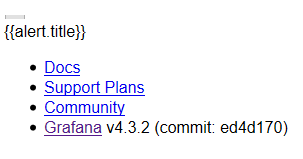
Grafanaやnginxの設定で、最後の/が抜けているとうまくリバースプロキシが働かないので注意が必要です。
